NewDaily AIAMS Connect

Your existing business software. Now ready for Ask Accounts.

Connect supported CRM and accounting systems to Daily AIAMS. Ask questions, explore balances, generate management reports and review approved actions from one place. Your team keeps using the software it already knows.

APIs, approved database connections, desktop bridges and file imports. Availability depends on your software and how it can be connected.

The site guide answers from this website and takes you to the right place.

Illustration with sample data. No customer system is connected here.

Illustration: an accounts package on an office PC, an online CRM and an Excel export connect to Daily AIAMS, and Ask Accounts answers a question about overdue customers with the source refresh time shown.

  • Connect: your existing software
  • Director briefings
  • Quotations
  • Purchase orders
  • Invoices
  • Receipts
  • Vendor bills
  • Vendor payments
  • Payroll
  • Tax certificates
  • Journal vouchers
  • General ledger
  • Profit and loss
  • Balance sheet
  • Cash flow
  • Aging reports
  • Data import
  • REST API
  • Ask Accounts

NewDaily AIAMS Connect

Already using accounting software?

Add an AI management layer.

You have the records. Give your managers a faster way to understand them. Ask Accounts brings permitted customer, sales and finance information into one clear conversation, with the records behind every answer and the age of the data in plain view.

  1. Connect your softwareThrough its API, an approved database connection, a desktop bridge or an exported file.
  2. Ask a questionIn plain language. The answer comes first, then the scope, the evidence and the source time.
  3. Review insight and approved actionsFollow-ups are prepared for a person to approve. Nothing changes on its own.
Ask AccountsSample conversation · sample data
Which customers are more than 60 days overdue?

Three customers owe PKR 4,120,000 more than 60 days past due.

  1. Ask
  2. Answer
  3. Drill down
  4. Propose
  5. Approve
Not a live connection. Names and amounts are made up.

Every answer carries four things

  1. The direct answerThe amount, trend or issue, in plain language.
  2. Its scopeCompany, period, currency, filters, source and last successful refresh.
  3. The evidenceTotals, links to the records and how the number was calculated.
  4. A next stepA drill-down, a report or a proposed action within your permissions.

Honest about gaps

  • Stale data shows a warning before the answer.
  • Missing sources are named, not filled in.
  • Explanations that are inferences are labelled as possible explanations.
  • Totals are calculated by the application, never by the language model.

One minute for your director

Monday briefing

Sample Trading · week to 26 Oct · PKR · sample data

Accounts package · 08:42 CRM · 08:30 Period in progress, not reconciled

1What changed

Collections fell 18%PKR 6.2M against 7.6M the week before
Supplier bills due this week rose9 bills, PKR 2.86M, due by 3 Nov

2Why it matters

Three customers passed 60 daysPKR 4.12M, two of them still ordering
Possible explanationTwo large receipts expected on 24 Oct have not arrived. Labelled as an inference, with the invoices linked.

3Needs a decision

Large new order from an overdue customerSaddar Electronics: new order 1.20M, overdue 0.86MStart a credit reviewNot now

Daily AIAMS Core

Keep your books in Daily AIAMS.

Quotations, invoices, bills, payroll, tax certificates and a double-entry ledger, with Ask Accounts answering from your own figures.

See how Core works

NewDaily AIAMS Connect

Keep your software. Add Ask Accounts.

Your accounting package, CRM or ERP stays the system of record. Managers get answers, briefings and reports, and approve any follow-up before it happens.

Explore Connect

Daily AIAMS Core

Would you rather keep the books here?

One set of books, from the first quotation to the tax certificate.

For businesses that send quotations, invoice against purchase orders, pay vendors and run a monthly payroll. Follow one sale through it.

  1. 1 of 5

    The client accepts your price.

    Line items, discount and tax in your own design. One click turns the accepted quotation into a draft invoice.

    QuotationQT-2026-00008
    Pak Meridian InsuranceAgent commission system
    Discovery workshop
    150,000.00
    System build, phase 1
    1,980,000.00
    Sales tax 15%
    319,500.00
    Total (PKR)
    2,449,500.00
    Valid for 30 daysAccepted
  2. 2 of 5

    The invoice is approved and issued.

    Checked against the purchase order limit, and approved by management when it is above your threshold.

    Sales tax invoiceINV-2026-00048
    Pak Meridian InsuranceFrom quotation QT-2026-00008
    Subtotal
    2,130,000.00
    Sales tax 15%
    319,500.00
    Purchase order limit
    Within limit
    Total (PKR)
    2,449,500.00
    Due in 30 daysIssued
  3. 3 of 5

    The client pays, less the tax they deduct.

    Full or partial receipts, one receipt across several invoices, with the payment proof attached.

    ReceiptRV-2026-00039
    Pak Meridian InsuranceAgainst INV-2026-00048
    Received by bank transfer
    2,351,520.00
    Tax deducted at source 4%
    97,980.00
    Settled (PKR)
    2,449,500.00
    Invoice fully paidReceived
  4. 4 of 5

    The ledger posts itself.

    Double entry, every time. Nothing posted is ever edited or deleted; it is reversed with an opposite entry.

    Journal voucherJV-2026-00212
    Dr Main bank account
    2,351,520.00
    Dr Withholding tax receivable
    97,980.00
    Cr Accounts receivable
    2,449,500.00
    Debits = Credits
    2,449,500.00
    Posted from the receiptIn balance
  5. 5 of 5

    The reports are already right.

    Profit and loss, balance sheet, cash flow, aging and client statements, each with an Excel export.

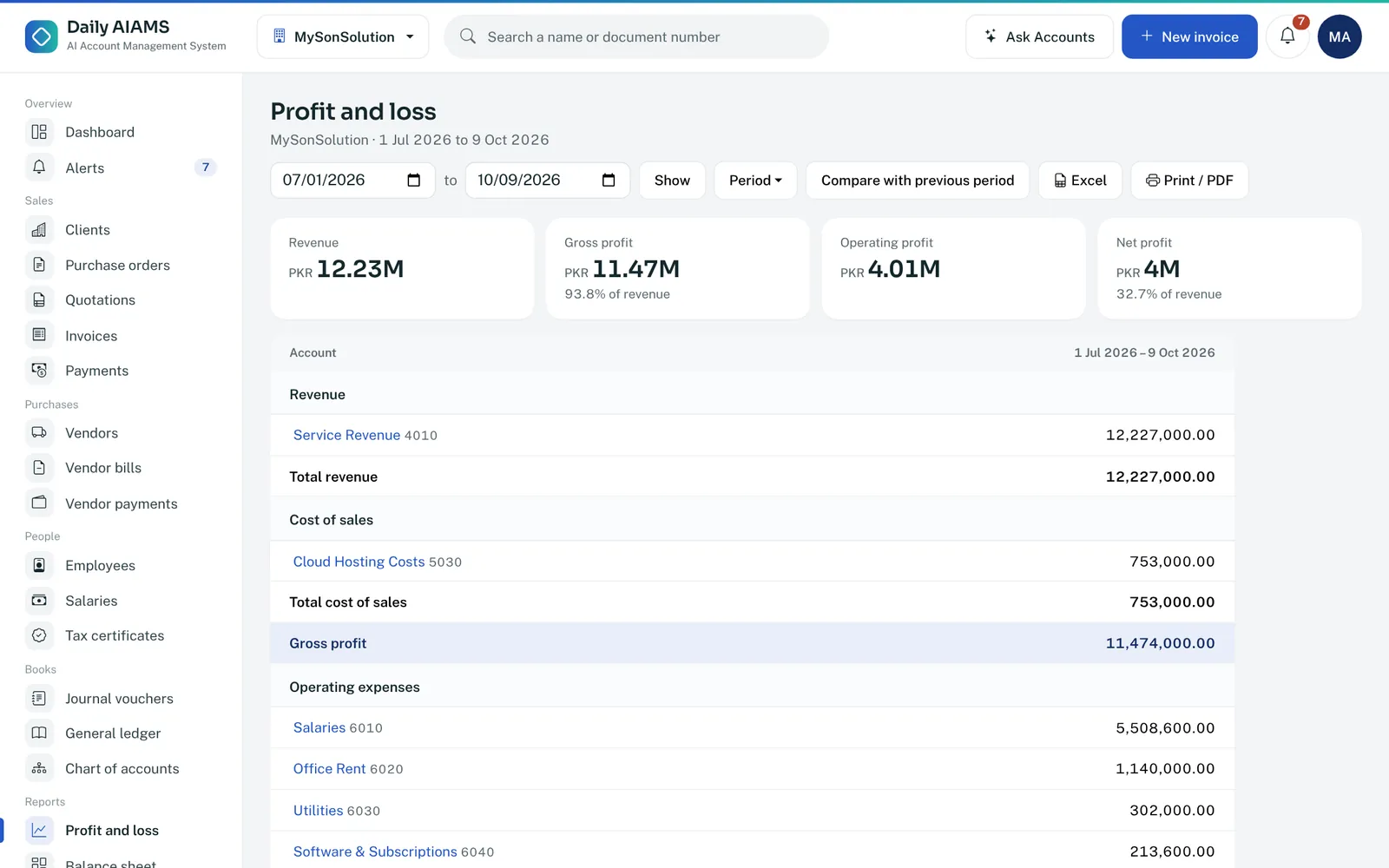
    Profit and lossYear to date
    Revenue12.23M
    Gross profit11.47M
    Net profit4.00M
    Balance sheet total
    24,150,706.00
    Assets = liabilities + equityUp to date

One company or a group

Each company keeps its own books, numbering, logo and tax rate, with a consolidated view on top.

Roles for every action

Seven starting roles, and every module and action can be ticked per role.

An audit trail

Who changed what, with the old and the new values, including everything the AI was asked.

Is it safe to let an AI near my books?

The AI prepares. A person approves.

Connect your own OpenAI key and the assistant works inside the permissions of whoever is using it. Every figure is calculated by the application, and nothing is saved until someone presses Confirm.

  1. You askin plain language
  2. It preparesa card, nothing saved
  3. You confirmor discard it
  4. Savedand in the audit trail
Ask AccountsIllustration, demonstration data
Show all unpaid invoices older than 60 days.

Two invoices are more than 60 days past their due date.

InvoiceClientDaysOutstanding
INV-2026-00016Sahil Logistics142339,500.00
INV-2026-00027Bolan Pharma711,512,250.00
Total1,851,750.00
Download as Excel

The assistant uses your OpenAI account. Questions, and the rows needed to answer them, are sent to OpenAI.

Ask Accounts

Unpaid invoices older than 60 days, purchase orders about to expire, revenue by company. Answers come as tables and charts.

Excel reports on request

Describe the report and get a workbook with several sheets, totals, formula columns and native charts.

Entries prepared for you

Draft an invoice, record a receipt or book an expense. A card shows exactly what would be saved, and you decide.

Purchase order reader

Upload a client's purchase order as a PDF or image. The form opens filled in, ready for you to check.

Kept under control

  • The model never touches the database. It asks for data through a short, validated list of queries.
  • Each query runs with the signed-in person's company access and role.
  • It cannot approve, post, cancel or delete anything.
  • One switch in Settings turns every AI feature off.

What is inside?

The whole finance desk in one place.

Seven areas of Daily AIAMS Core that share one ledger, one set of permissions and one audit trail. Pick one on the map, or scroll through them.

Show what matters to
One ledger

Sales

Quotations, purchase orders, invoices and receipts.

  • Quotation to invoice in one click
  • Purchase order limits checked on every invoice
  • Partial receipts and tax deducted at source

Purchases

Vendors, bills and payments.

  • Bills charged to expense or asset accounts, with input tax
  • The same vendor invoice cannot be entered twice
  • Payables aging by due date

Payroll

Salaries and employee tax certificates.

  • Each month prepared from every person's pay, with tax suggested from your slabs
  • Tax deposit records against each month
  • Certificates in your wording, one PDF per employee

Books and reports

The ledger and the financial statements.

  • Double entry throughout, with balanced vouchers only
  • Profit and loss, balance sheet and cash flow
  • Excel export on every report

Data import

Bring your books with you.

  • Presets for QuickBooks, Xero, Tally, Sage, Zoho Books and Odoo, or any CSV or Excel file
  • A trial run shows what would happen before anything is saved
  • An import can be undone

API

Connect your other systems.

  • Tokens limited by permission, company and expiry date
  • A built-in guide and an OpenAPI file
  • Retries that never create a duplicate

Your brand

Make the product and its documents yours.

  • Your name, logo and colours on every screen
  • Designs for quotations, invoices, purchase orders and tax certificates
  • Your own extra fields on clients, documents and employees

Can I see it before I ask for a demo?

A look inside.

Real screens from the software and three of the documents it prints, all from the demonstration company. Select any picture to see it full size.

  • Quotation
  • Sales tax invoice
  • Employee tax certificate
11kinds of record you can import
6accounting systems with a ready-made import preset
55documented API addresses
4document designs per company
3financial statements, always current

How long until it is useful?

From your old system to your first answer in four steps.

Brings your books in from QuickBooks Xero Tally Sage Zoho Books Odoo or any CSV or Excel file
  1. Bring your books

    Import accounts, clients, vendors, opening balances and open invoices. Run it as a trial first and check the result.

  2. Make it yours

    Set your name, logo, colours, document designs, numbering and who may do what.

  3. Run the day

    Quote, invoice, pay bills and run payroll. The ledger and the statements keep themselves.

  4. Ask

    Add your OpenAI key, switch the assistant on and ask your accounts a question.

Can I earn from recommending it?

Refer a business. Earn 20% every month.

Introduce Daily AIAMS to a company that needs it. When they subscribe, you receive 20% of what they pay, each month, for as long as they stay a customer.

  1. ApplySend the form below and choose "Affiliate programme".
  2. IntroduceBring us accountants, agencies and business owners you know.
  3. Get paid monthly20% of every monthly payment from the customers you referred.

Make accounting software or keep books for clients? Ask about the Connect partner programme: a connector for your product, a test environment and an AI extension your customers can add. Talk to us

20%

Your share of every paymentMove the slider to see what it adds up to.

PKR 200,000
You earn each monthPKR 40,000
Over twelve monthsPKR 480,000

An estimate: 20% of the subscription payments received from customers you referred.

Can I try it myself?

Try it with sixteen months of books already inside.

The Core demonstration company has clients, vendors, employees, quotations, invoices, bills, salaries and tax certificates ready to explore. For Connect, book an integration demo and we will walk through it with sample data from software like yours.

Request a demo

How do I reach a person?

Talk to us.

Book an integration demo, ask for a walkthrough of Core, pricing or the affiliate programme. Your message goes straight to our inbox.

Or write to
Check my software compatibility

This form is protected by reCAPTCHA. The Google Privacy Policy and Terms of Service apply.

Site guide. It answers from this website. Esc to close.

Live Help

Hi there! Have a question about Daily AIAMS? Chat with our team on WhatsApp.